在 editor 混用 Prettier 與 ESLint
前篇 Prettier + ESLint 提過了兩者的合作方式,這篇主要是筆記在各主流 editor 下……
- Prettier 與 ESLint 的 editor/IDE 外掛
- 「混用 Prettier 與 ESLint 格式」的設定
- 「存檔時自動排版」的設定
VSCode
Prettier + ESLint: Turn on Prettier: ESLint Integration (to use
prettier-eslintinstead)
Turn on Format on Save

Sublime Text 3
Packages:
- JsPrettifier: provide a command to format the file
- SublimeLinter + SublimeLinter-eslint to display lint status/message on UI
- ESLint Fix: provide a command & hotkeys to fix the file
Change settings of JsPrettifier:
 1{
 2  // To use `prettier-eslint`
 3  "prettier_cli_path": "<path_to_prettier-eslint>",
 4
 5  // Format on Save
 6  "auto_format_on_save": true,
 7  "auto_format_on_save_excludes": [
 8    "*node_modules/*",
 9    "*.json"
10  ]
11}
Vim 跟 WebStorm 的 Prettier plugin 都無法直接改用 prettier-eslint,所以
- 要用較複雜的方式存檔時自動格式化
- plugin 提供的 UI 指令只能使用原本的 Prettier
Vim
Plug-ins:
- scrooloose/syntastic ⇒ display linter (ESLint) error & messages
- prettier/vim-prettier ⇒ provide command
:Prettier(withouteslint --fix)
Add settings to .vimrc:
 1""" Use ESLint as linter of JavaScript
 2let g:syntastic_javascript_checkers = ['eslint']
 3let g:syntastic_javascript_eslint_exec = 'eslint'
 4
 5"""
 6""" for "Format on Save"
 7"""
 8autocmd BufWritePre
 9    \ *.js,*.jsx,*.mjs,*.ts,*.tsx,*.json,*.vue
10    \ Prettier
11set autoread  " Reload if file is changed outside of Vim
12
13let g:syntastic_javascript_eslint_args = [‘--fix’]
14function! SyntasticCheckHook(errors)
15  checktime  " Check file changes
16endfunction
WebStorm
All necessary plugins are built-in:
- JavaScript Support (for ESLint): display lint status & messages, and provide
Fix ESLint problemscommand - Prettier: provide
Reformat with Prettiercommand (w/oeslint --fix)
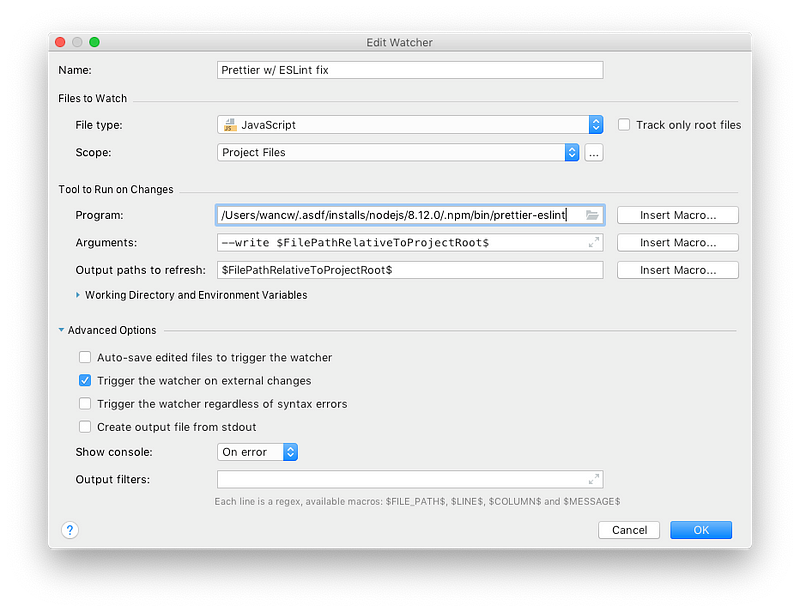
Use File Watcher to Format on Save